What started this odyssey
When working on multiple features on multiple worktrees it became hard to keep track of which claude session did what and based on the feature what exactly had been done until this point. If you're someone who has 50 chrome tabs open at any given point, this is a HUGE issue.
How herdr partially solved this (for me)
herdr has the concept of spaces/tabs/panes/agents, so in theory within any space you open a claude session, it will pop up in your agents tab as well. so name the agents well and you should be able to keep track of what is going on. nice.
Why herdr didnt work for me :(
- The agents tab was not really useful. Multiple agents in the same directory would clutter the tab.
- subagents don't popup in the agents tab. claude runs a subagent inside the same session, not as a new process or terminal, so herdr has nothing to pick up. The only trace is the subagent's transcript file on disk.
- The subagent who did the task is missing, and now i have to communicate with its parent(?) agent. When a claude session calls multiple subagents for multiple tasks, Not being able to go through the logs of the agent who did the particular job and not talk to it directly feels like I'm not getting my moneys worth. Not only am i burning tokens trying to recollect information, there will inevitably be a game of telephone which will garble information.
Enter brigd
brigd (derived from brigade, like a kitchen brigade) is an agent orchestration framework inspired by LangGraph. In essence it allows you to explain your problem and then have complete visibility over every step of the process, what each agent did, the files it touched and talk directly to the agent who did a certain task(finally).
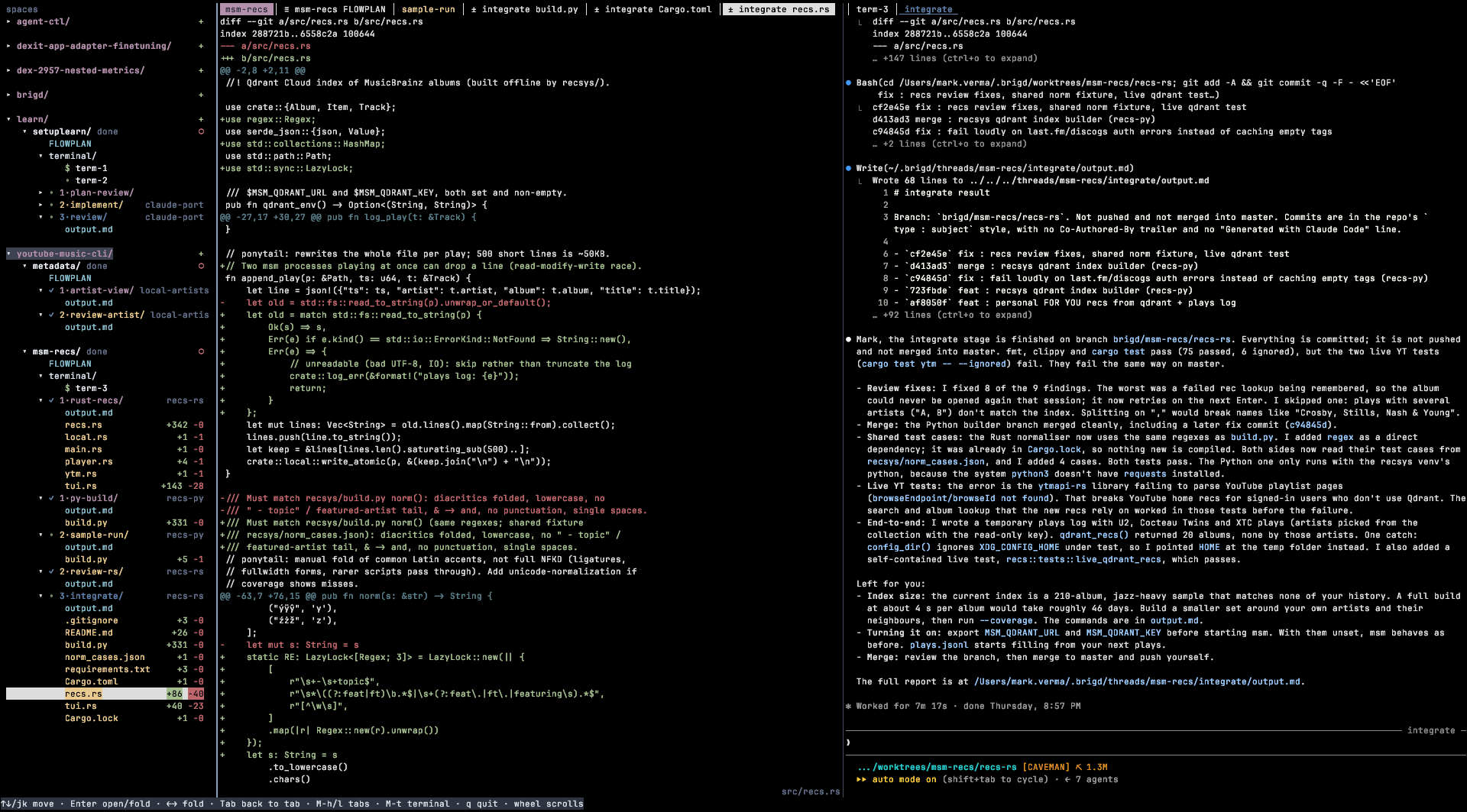
It is intended for long tasks and large features where you are required to know what code changed and for you to come back to and go through the entire design process to why you or an agent did something.
Thread
A thread is one run of a flow. You start one with brigd <name> "task" from inside the repo you want to work on OR from the TUI, and everything about it lives under ~/.brigd/threads/<name>/: the flowmap.json, a state.json that tracks where it is, and a folder per agent with its prompt and its output.md.
Every agent in a thread is a real interactive claude session, not a headless job. brigd saves each session id, so even after the agent is done or brigd was closed, opening it from the sidebar reopens it with claude --resume and you can just resume your work. If you stop halfway, brigd resume <name> picks the thread up where it left off.
Each thread gets its tabs, and you can split it into two panes with Ctrl-o v. The new pane opens a terminal and has its own tab bar, and Ctrl-o o switches between the two. Two is the max on purpose. Realistically most people are not going to use more than 2 panes side by side, and if you need more open a new tab(you're not shipping more with 4 small panes, it'll just look like you are....ok i can see why someone might want this).
This is the part that fixes my original problem. I no longer have to remember which session did what, the thread remembers it for me, and i talk to the agent that did the work instead of asking another agent to reconstruct it.
Flowmap
The flowmap is the plan for a thread, an overview of what is happening or has happened in this thread. It is a JSON file with a goal and a list of stages, and each stage is a list of agents. Stages run in order, and the agents inside a stage run in parallel. Each agent gets its own model, effort, mode and optionally its own git worktree, so two agents editing code don't step on each other.
{
  "goal": "...",
  "stages": [
    [{ "name": "plan", "model": "opus", "effort": "high", "worktree": null, "task": "..." }],
    [{ "name": "build", "model": "sonnet", "effort": "medium", "worktree": "build", "task": "..." }]
  ]
}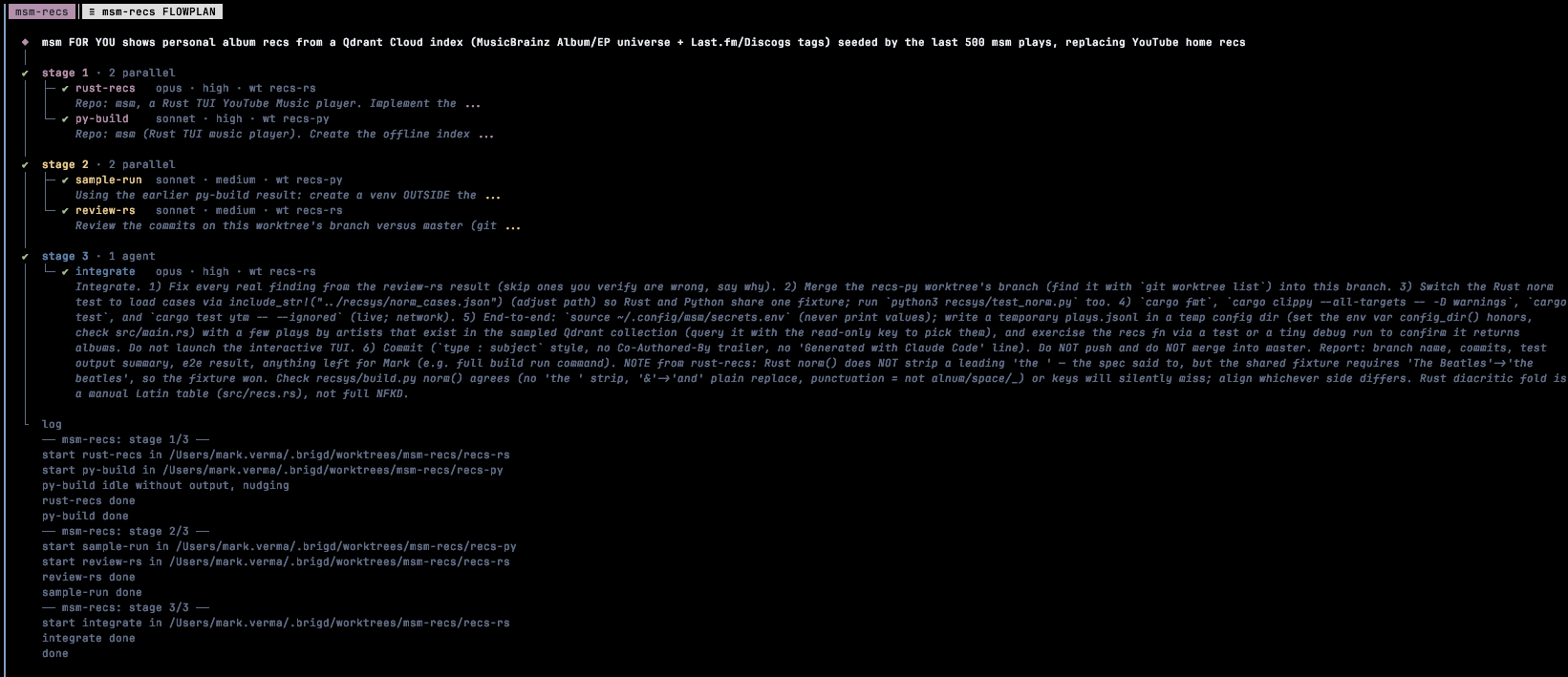
You do not have to write these. The brigd-plan skill takes a plain english task and turns it into a flowmap, and brigd shows it to me before it runs. A later stage doesn't get a summary of what came before, it gets the paths to the earlier agents' output.md files and reads what it needs. That cuts down a lot on the game of telephone.
Spaces
I kept the word from herdr but dropped the rest. In brigd a space is just a repo (named after its folder), and the sidebar is one tree: space → thread → agent → subagent → output. There are no tabs vs panes decisions to make before i can start working.
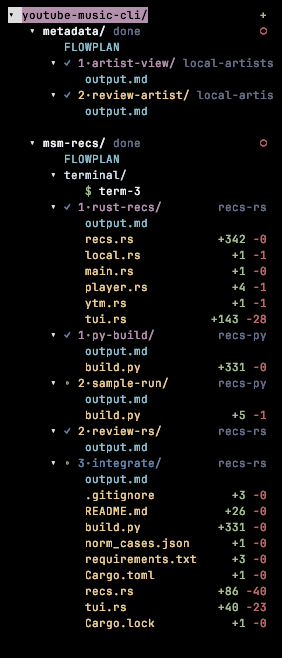
- Topmost valueThe main directory (the repo, here
youtube-music-cli) that all the worktrees branch off from. - Greyed outThe worktree that agent is working on (e.g.
recs-rs,recs-py). - ColoredThe agent's name (e.g.
rust-recs,review-rs,integrate). - Under each agentEvery file it touched, with its
+added -removedline count.
The tree is also where i control things. Each space row has a + that opens the new thread dialog for that repo: give it a name and a task, brigd plans it and asks me to confirm. Each thread row has a red dot that stops every agent in that thread at once (it sends them Esc), and clicking it again tells them all to continue. If one agent goes off the rails, right click it and hit Terminate, which kills it and reverts the files it changed but keeps its output.
Subagents show up in that tree too. brigd reads the subagent transcripts claude writes for each session and mirrors them under the agent that spawned them, nested the same way they were called, with their own output.md.
Under each agent you also see every file it touched, including edits made by its subagents. brigd gets that list from the claude transcripts, so it is per agent even when several agents share the same repo. Each file row shows its +added -removed line count, and opening it shows a colored diff against the commit the agent started from. Once the agent is done, brigd saves that diff, so later stages or my own edits don't change what that agent's diff looks like.
So the two things that annoyed me most about herdr are covered:
- subagents are visible in the sidebar, not lost in their own PTY.
- their logs are right there, so i can read exactly what the subagent did instead of asking the parent agent to remember.
Agent Extendable Flowmaps
brigd rereads flowmap.json before every stage. That means a running agent is allowed to change the plan: it can add, edit or remove later stages (never its own or earlier ones), and brigd picks up the new version when the stage ends. If the edited file is invalid, brigd logs it and keeps the previous flow.
plan-review-go skill is where i use this the most. If i add "use plan-review-go" to the task, stage 1 is the only planned stage. That agent drafts a plan, gets it reviewed by ponytail, grills it, and asks me the questions it can't answer. Once i approve, it appends the implementation stages to the flowmap itself and brigd runs them.
This way the plan that gets executed is the one i actually agreed to, and it is written by the agent that had the whole conversation with me, not guessed up front before anyone looked at the code.
What next?
Right now brigd only works with claudecode. I plan on adding support for codex/gemini/kimi in the near future. If you have any features you think would benefit brigd you are open to contribute. Code available on https://www.github.com/markvrma/brigd.